作者: 刘, 博

  • OpenHarmony小型系统输入子系统解析

    前言

    本文将以鼠标为例介绍小型系统上的输入系统架构以及输入信号传递的整个流程。

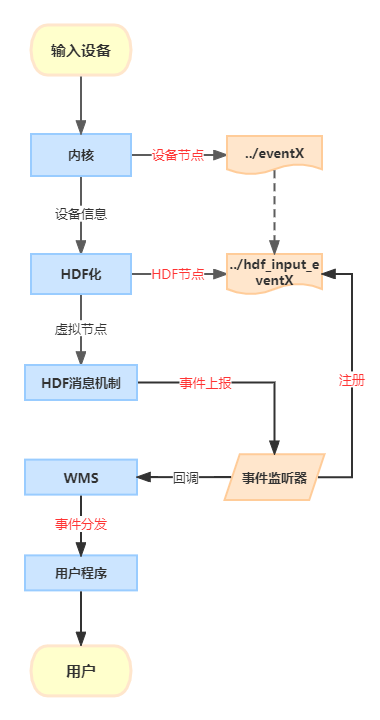
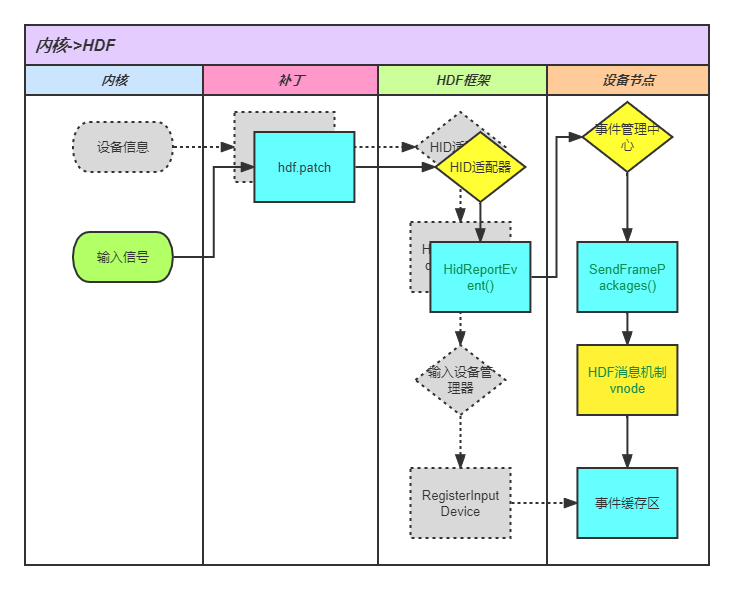
    一、大致流程

    1. 输入设备产生信号,内核接收到并处理信号;
    2. 内核将处理后的信号传递给HDF化后的设备节点;
    3. HDF对信号进行事件上报,也就是通过HDF的消息机制与用户空间空间进行交互;
    4. 最后WMS给用户程序进行事件分发。
      flowchart.png

    二、内核到HDF

    一)、框架生成部分
    由于硬件到内核这一步与linux没有太多的不同,在这里不做过多的介绍。

    1. HDF设备的注册以及后续的输入信号传递都是通过给内核添加补丁来实现的。
      kernel/linux/patches/linux-4.19/common_patch/hdf.patch
    +    dev->devType = type;
    +    dev->devName = hdev->name;
    +    hdev->input_dev = HidRegisterHdfInputDev(dev);  //Hid设备注册接口
    +    if (hdev->input_dev == NULL) {
    +        printk("%s: RegisterInputDevice failed\n", __func__);
    +    }
    +    kfree(dev);
    +    dev = NULL;
    +}
    +#endif
    1. HidRegisterHdfInputDev()的主要作用是调用管理器的注册接口。
      drivers/hdf_core/framework/model/input/driver/hdf_hid_adapter.c
    void* HidRegisterHdfInputDev(HidInfo *info)
    {
        InputDevice* inputDev = HidConstructInputDev(info);
        if (inputDev == NULL) {
            HDF_LOGE("%s: hid construct input Dev failed", __func__);
            return NULL;
        }
    
        if (InputDriverLoaded()) {
            DoRegisterInputDev(inputDev); //将调用管理器的接口RegisterInputDevice()
        } else {
            CacheHid(inputDev);
        }
        return inputDev;
    }
    1. 管理器的RegisterInputDevice()完成分配id、缓存和生成HDF设备节点。
      drivers/hdf_core/framework/model/input/driver/hdf_hid_device_managerr.c
    int32_t RegisterInputDevice(InputDevice *inputDev)
    {
        int32_t ret;
    
        HDF_LOGI("%s: enter", __func__);
        if (inputDev == NULL) {
            HDF_LOGE("%s: inputdev is null", __func__);
            return HDF_ERR_INVALID_PARAM;
        }
    
        if ((g_inputManager == NULL) || (g_inputManager->initialized == false)) {
            HDF_LOGE("%s: dev manager is null or initialized failed", __func__);
            return HDF_FAILURE;
        }
    
        OsalMutexLock(&g_inputManager->mutex);
        ret = AllocDeviceID(inputDev);  //分配设备ID
        if (ret != HDF_SUCCESS) {
            goto EXIT;
        }
        ret = CreateDeviceNode(inputDev);  //创建设备节点,也就是上面所述的hdf_input_eventX
        if (ret != HDF_SUCCESS) {
            goto EXIT1;
        }
    
        ret = AllocPackageBuffer(inputDev);  //分配包的缓存
        if (ret != HDF_SUCCESS) {
            goto EXIT1;
        }
    
        AddInputDevice(inputDev);
        OsalMutexUnlock(&g_inputManager->mutex);
        HDF_LOGI("%s: exit succ, devCount is %d", __func__, g_inputManager->devCount);
        return HDF_SUCCESS;
    
    EXIT1:
        DeleteDeviceNode(inputDev);
    EXIT:
        OsalMutexUnlock(&g_inputManager->mutex);
        return ret;
    }
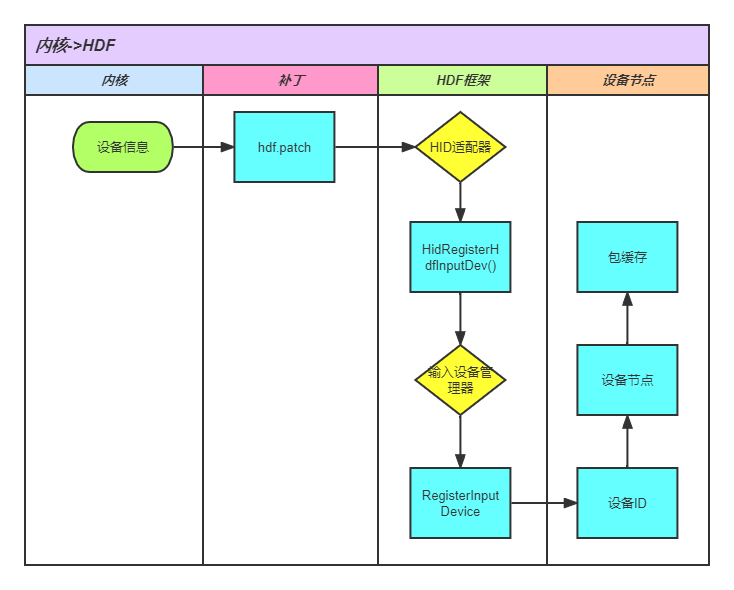
    flowchart1.png

    二)、信号传递部分
    上面步骤准备就绪后,如上提及,鼠标的信息传递也是通过内核调用了HDF接口向用户空间传输鼠标的事件信号。

    1. 补丁调用适配器接口发送输入事件信息。
      hdf.patch
    +#if defined(CONFIG_DRIVERS_HDF_INPUT)
    +    if (hid->input_dev) {
    //内核获取到的输入设备产生的信号,将信号通过事件上报传递到HDF
    +        HidReportEvent(hid->input_dev, usage->type, usage->code, value); 
    +    }
    +#endif

    hdf_hid_adapter.c

    void HidReportEvent(const void *inputDev, uint32_t type, uint32_t code, int32_t value)
    {
    #ifdef CONFIG_DFX_ZEROHUNG
        if (type == EV_KEY && code == KEY_POWER)
            hung_wp_screen_powerkey_ncb(value);
    #endif
        InputDevice *device = (InputDevice *)inputDev;
        PushOnePackage(device, type, code, value);  //调用了event_hub.c中的接口,先打包,再发送
        if (type == EV_KEY && KEY_RESERVED < code && code < KEY_MAX && value == 0 && code == g_kbdcode) {
            OsalTimerDelete(&g_timer);
            g_kbdcode = 0;
        }
        if (type == EV_KEY && KEY_RESERVED < code && code < KEY_MAX && value == 1 &&
            device->devType == INDEV_TYPE_KEYBOARD) {
            g_kbdcode = code;
            RepateEvent(device);
        }
    }
    1. 经过event_hub处理进行下一步的传递
    // PushOnePackage()在这里的作用就是将事件流打成包的形式进行传递
    // 代码过长不展示,PushOnePackage()处理完成包后就开始进入HDF消息机制了
    static void SendFramePackages(InputDevice *inputDev) //该函数由PushOnePackage调用
    {
        struct HdfDeviceObject *hdfDev = inputDev->hdfDevObj;
        if (hdfDev == NULL || inputDev->pkgBuf == NULL) {
            HDF_LOGE("%s: hdf dev is null", __func__);
            return;
        }
        //  HDF消息机制的事件上报接口
        int32_t ret = HdfDeviceSendEvent(hdfDev, 0, inputDev->pkgBuf);
    }
    flowchart2.png

    三、HDF到WMS

    1. WMS简单介绍
      源码位置由foundation/graphic/wms变更至/foundation/window/window_manager_lite
      WMS全称是Window Manager Service,顾名思义,该服务就是用来管理窗口和绘画光标等操作的。该组件里还包含了另一个必不可少的组件IMS(Input Manager Service),同理,它是用来处理输入事件的,
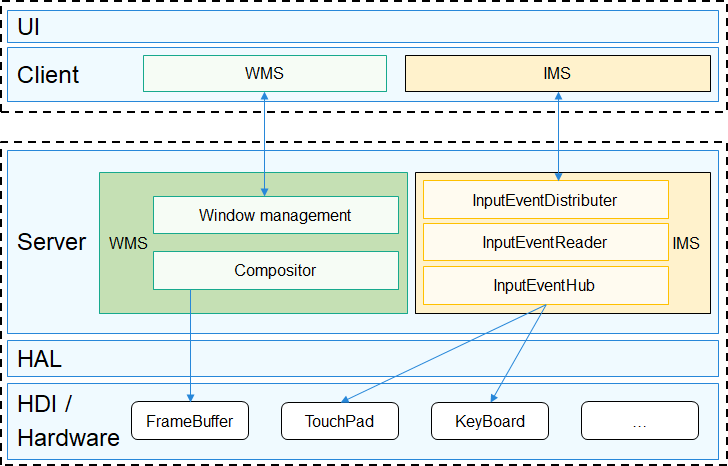
      WMS.png
      由图可知,IMS也有一个eventhub,很容易想到这边的eventhub就是用来接收内核态的evenhub发来的输入信号的。
    2. 消息机制简单介绍
      HDF消息机制是建立用户态应用和内核态驱动的交互。主要功能有两个,一个是用户态应用发送消息到驱动,另一个是用户态应用接收驱动主动上报事件。主要接口有如下

    |接口|描述|
    |-|-|
    |struct HdfIoService *HdfIoServiceBind(const char *serviceName);|用户态获取驱动的服务,获取该服务之后通过服务中的Dispatch方法向驱动发送消息。|
    |void HdfIoServiceRecycle(struct HdfIoService *service);|释放驱动服务。|
    |int HdfDeviceRegisterEventListener(struct HdfIoService *target, struct HdfDevEventlistener *listener);|用户态程序注册接收驱动上报事件的操作方法。|
    |int HdfDeviceSendEvent(struct HdfDeviceObject *deviceObject, uint32_t id, struct HdfSBuf *data);|驱动主动上报事件接口。|

    该消息机制的实现方法大概就是对上面相应设备的事件缓存区进行操作,具体可以查阅代码。

    1. 信号传递过程
      如上表所示,内核态的eventhub最终调用了事件上报接口,但是事件监听器不是在IMS中的eventhub注册的。而是由硬件抽象层drivers/peripheral/input/hal中注册的。并且封装成了API供IMS使用。有input_controller,input_manager和input_reporter,分别管理输入设备的的上电、开关以及事件接收。input_reporter.h里的主要接口如下

    |接口|描述|
    |-|-|
    |int32_t (*RegisterReportCallback)(uint32_t devIndex, InputEventCb *callback);|注册事件上报的回调函数|
    |int32_t (UnregisterReportCallback)(uint32_t devIndex);|注销| |int32_t (RegisterHotPlugCallback)(InputHostCb callback);|注册热插拔事件上报的回调函数| |int32_t (UnregisterHotPlugCallback)(void);|注销|

    1. IMS注册事件上报的回调函数。(源码此处有问题,仅做部分展示)
    // input_event_hub.cpp
    ret = inputInterface_->iInputManager->OpenInputDevice(mountDevIndex_[i]);  //首先要打开设备
    if (ret == INPUT_SUCCESS && inputInterface_->iInputReporter != nullptr) {
        callback_.EventPkgCallback = EventCallback;  //进行callback绑定
        ret = inputInterface_->iInputReporter->RegisterReportCallback(mountDevIndex_[i], &callback_);  //以设备号注册回调函数,此处设备号对应hdf_input_eventX中的X
        if (ret != INPUT_SUCCESS) {
            GRAPHIC_LOGE("device dose not exist, can't register callback to it!");
            return;
        }
        openDev_ = openDev_ | (1 << i);
    }

    注册完毕后,当鼠标触发了输入信号,将在回调函数中接收到事件。
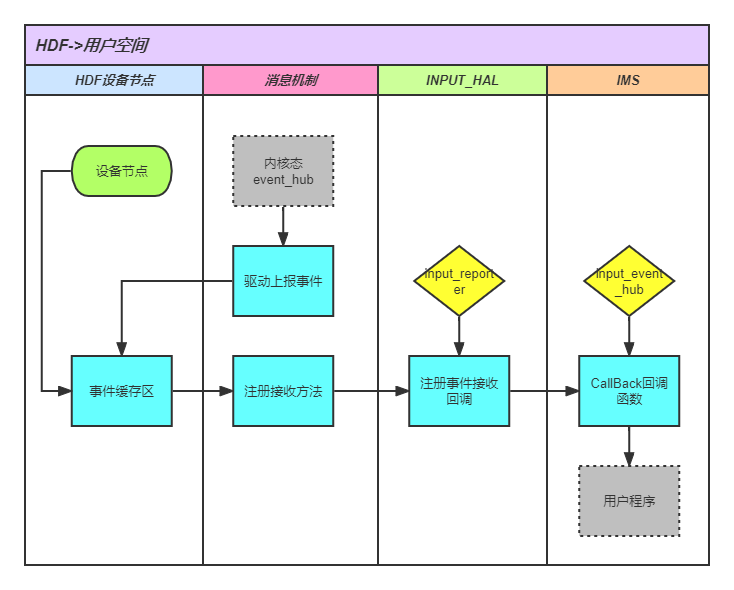
    flowchart3.png

    至此,输入信号从内核传递到了用户空间。

    四、WMS到用户程序

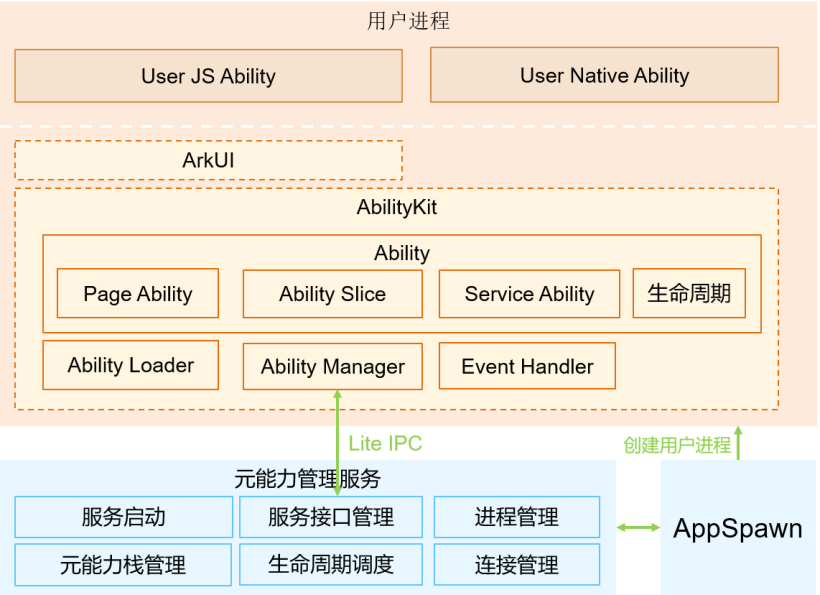
    用户程序与WNS硬件之间的交互体现在UI与WMS之间或者UI直接与HAL层的交互。
    请添加链接描述
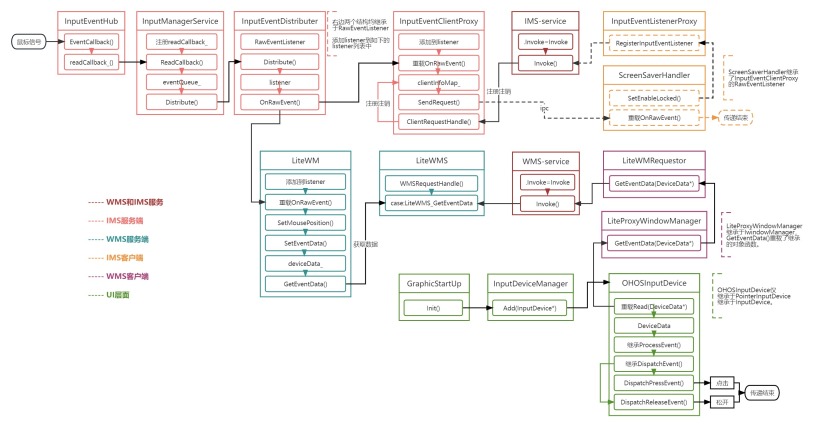
    在这里源码不做过多分析,留一张流程图。
    IMS到UI.jpg
    高清pdf放在附件里

    总结

    开源鸿蒙小型系统的输入功能仍未完善,比如热插拔问题和屏幕HDF化的设计没有考虑到无触控屏的开发板等的问题。于是在这里,我将我学到的知识分享给大家与大家共同讨论。
  • 使用CPP编写小型系统app

    前言

    本文将介绍如何使用cpp编写用于小型系统的app。

    一、ability相关介绍

    Ability是应用所具备能力的抽象,也是应用程序的重要组成部分。Ability是系统调度应用的最小单元,是能够完成一个独立功能的组件。一个应用可以包含一个或多个Ability。其中ability又分为Page类型的和Service类型的,前者是为用户提供人机交互能力的,后者是提供后台任务机制的,简单来讲就是Page带界面,Service不带界面。这里将重点介绍Page类型的ability。
    使用CPP编写小型系统app-鸿蒙开发者社区
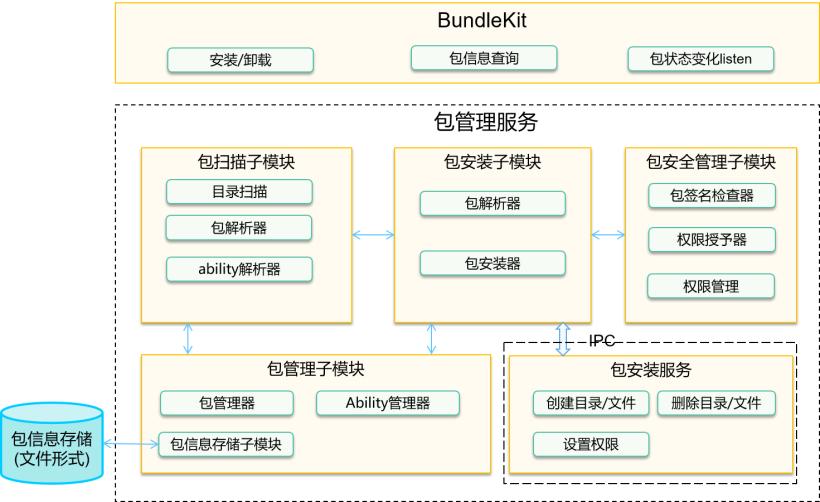
    使用到的子系统有ability子系统、包管理子系统和图形ui子系统。ability子系统是管理OpenHarmony应用运行状态的开发框架;包管理子系统是OpenHarmony为开发者提供的安装包管理框架;图形ui子系统提供基础UI组件和容器类组件。
    使用CPP编写小型系统app-鸿蒙开发者社区

    二、简单实现

    2.1 ability和abilityslice
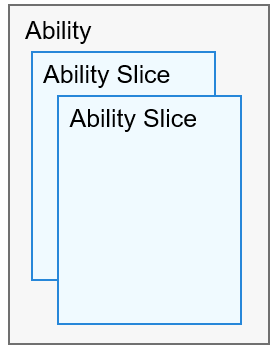
    abilityslice是单个页面及其控制逻辑的总和,是Page类型Ability特有的组件,一个Page类型的Ability可以包含多个AbilitySlice,此时,这些页面提供的业务能力应当是高度相关的。
    使用CPP编写小型系统app-鸿蒙开发者社区
    2.2 生命周期
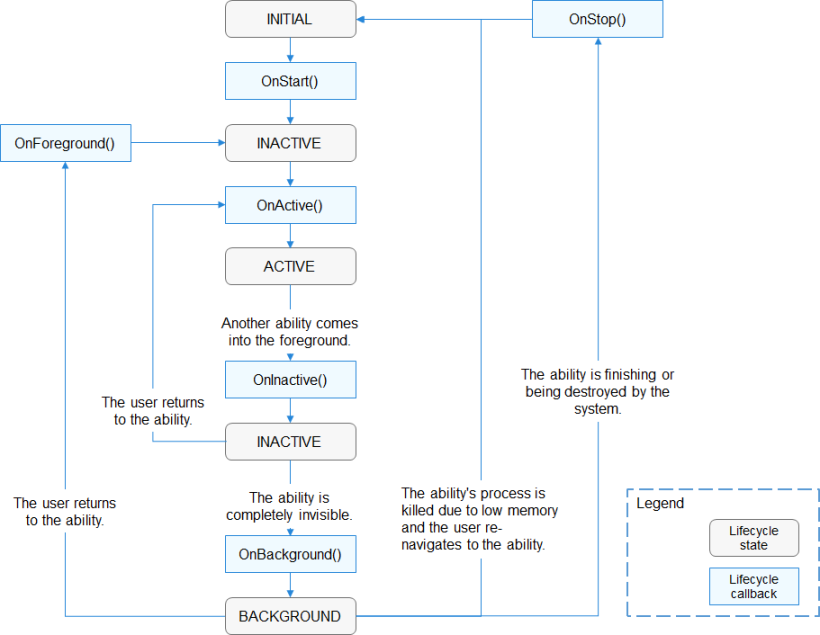
    整体流程下来大致有OnStart()、OnAvtive()、OnInactive()、OnBackground()和OnStop()五阶段。abilityslice生命周期与ability相似,但是仍要区分。
    使用CPP编写小型系统app-鸿蒙开发者社区
    2.3 hello world

    ./helloworld/
    ├── config.json                         //配置文件
    ├── resource                            //资源
    └── src                                 //主要文件
        ├── include
        │   ├── main_ability.h
        │   └── main_ability_slice.h
        └── main
            ├── main_ability.cpp
            └── main_ability_slice.cpp
    

    首先定义并注册ability

    // main_ability.h
    #ifndef HELLO_MAIN_ABILITY_H
    #define HELLO_MAIN_ABILITY_H
    
    #include "ability_loader.h"
    
    namespace OHOS {
    class MainAbility : public Ability {
    protected:
        void OnStart(const Want &want) override; //Want结构体,ability的相关信息
        /*
         * 由于在这里我们只要简单的展示helloworld标签,其它函数不需要重载。
         */
        // void OnInactive() override;
        // void OnActive(const Want &want) override;
        // void OnBackground() override;
        // void OnStop() override;
    };
    }
    
    #endif
    
    //main_ability.cpp
    #include "main_ability.h"
    
    namespace OHOS {
    REGISTER_AA(MainAbility) //使用REGISTER_AA注册ability
    
    void MainAbility::OnStart(const Want &want)
    {
        printf("This is MainAbility OnStart status!\r\n");
        SetMainRoute("MainAbilitySlice"); //设置主页面为MainAbilitySlice,这要与后续的slice名字匹配
    
        Ability::OnStart(want);
    }
    }
    

    AbilityMainAbility继承设置主slice为MainAbilitySlice重写OnStart()AbilityMainAbility

    最后编写slice界面

    //main_ability_slice.h
    #ifndef HELLO_ABILITY_SLICE_H
    #define HELLO_ABILITY_SLICE_H
    
    #include "ability_loader.h"
    #include "ability_manager.h"
    #include "bundle_manager.h"
    #include "components/ui_label.h"
    
    namespace OHOS {
    class MainAbilitySlice : public AbilitySlice { //创建AbilitySlice类 与上面同名
    public:
        MainAbilitySlice() = default;
        virtual ~MainAbilitySlice();
    
    protected:
        void OnStart(const Want &want) override;
        /*
         * 同理
         */
        // void OnInactive() override;
        // void OnActive(const Want &want) override;
        // void OnBackground() override;
        // void OnStop() override;
    };
    }
    #endif
    
    //main_ability_slice.cpp
    #include "main_ability_slice.h"
    const int screen_width = 720;
    const int screen_height = 1280;
    
    namespace OHOS {
    REGISTER_AS(MainAbilitySlice)
    
    MainAbilitySlice::~MainAbilitySlice()
    {
        printf("This is ~MainAbilitySlice!\r\n");
    }
    
    void MainAbilitySlice::OnStart(const Want& want)
    {
        AbilitySlice::OnStart(want);
        RootView* rootView_ = RootView::GetWindowRootView(); //创建底层界面
        rootView_->SetPosition(0, 0, screen_width, screen_height);
        rootView_->SetStyle(STYLE_BACKGROUND_COLOR, Color::ColorTo32(Color::Black()));
        rootView_->SetFocusable(true);
        rootView_->SetInterceptFocus(false);
    
        UILabel* label = new UILabel(); //创建label写入Hello World
        label->SetPosition(0, 0, 720, 64);
        label->SetText("Hello World!");
        label->SetFont("SourceHanSansSC-Regular.otf", 64);
        label->SetStyle(STYLE_TEXT_COLOR, Color::ColorTo32(Color::White()));
    
        rootView_->Add(label); //将label放入rootView
    
        SetUIContent(rootView_); //设置显示RootView UI
    }
    }
    #endif
    

    AbilitySliceMainAbilitySlice继承与上设置的MainAbilitySlice同名重写OnStart()AbilitySliceMainAbilitySlice

    2.4 config.json的编写

    //config.json
    {
        "app": {
            "bundleName": "com.sample.hello",
            "vendor": "sample",
            "version": {
                "code": 1,
                "name": "1.0"
            },
            "apiVersion": {
                "compatible": 3,
                "target": 4
            }
        },
        "deviceConfig": {
            "default": {
            }
        },
        "module": {
            "package": "com.sample.hello",
            "name": ".MyHarmonyAbilityPackage",
            "deviceType": [
                "phone",
                "tv",
                "tablet",
                "pc",
                "car",
                "smartWatch",
                "sportsWatch",
                "smartVision"
            ],
            "distro": {
                "deliveryWithInstall": true,
                "moduleName": "hello",
                "moduleType": "entry"
            },
            "abilities": [ //ability配置声明
                {
                    "name": "MainAbility",
                    "label": "hello world app",
                    "launchType": "standard",
                    "type": "page",
                    "visible": true
                }
            ]
        }
    }
    

    三、hap编译

    3.1 通过BUILD.gn与系统一并编译。
    使用到编译链中的hap_pack,添加配置 import(“//build/lite/config/hap_pack.gni”)

    import("//build/lite/config/hap_pack.gni")
    
    shared_library("hello") {
      sources = [
        "src/main/main_ability.cpp",
        "src/main/main_ability_slice.cpp"
      ] #将主要文件编译出库
    
      deps = [
        "${aafwk_lite_path}/frameworks/ability_lite:aafwk_abilitykit_lite",
        "${appexecfwk_lite_path}/frameworks/bundle_lite:bundle",
        "//foundation/graphic/ui:lite_ui",
        "//foundation/graphic/utils:lite_graphic_utils",
        "//foundation/systemabilitymgr/samgr_lite/samgr:samgr",
      ]
    
      include_dirs = [
        "src/include",
        "${aafwk_lite_path}/interfaces/kits/ability_lite",
        "${aafwk_lite_path}/interfaces/kits/want_lite",
        "${appexecfwk_lite_path}/interfaces/kits/bundle_lite",
      ]
    
      ldflags = [ "-shared" ]
      ldflags += [ "-lstdc++" ]
      ldflags += [ "-L$ohos_root_path/sysroot/usr/lib" ]
      ldflags += [ "-Wl,-rpath-link=$ohos_root_path/sysroot/usr/lib" ]
      ldflags += [
        "-lui",
        "-lability",
      ] #添加依赖
    
      defines = [
        "ENABLE_WINDOW=1",
        "ABILITY_WINDOW_SUPPORT",
        "OHOS_APPEXECFWK_BMS_BUNDLEMANAGER",
      ] #配置定义
    }
    
    hap_pack("hello_hap") { #打包成hap
      deps = [ ":hello" ]
      mode = "hap"
      json_path = "config.json"
      ability_so_path = "$root_out_dir/libhello.so" #编译后的库文件
      force = "true"
      cert_profile = "com.huawei.launcher_AppProvision_release.p7b" #由于不清楚获取证书方法 先用源码案例自带的证书代替
      resources_path = "resources"
      hap_name = "hello"
    }


    3.2 通过app_packing_tool单独编译
    该打包工具在源码目录developtools/packing_tool/jar下
    主要参数如下

    命令参数对应的资源文件说明是否可缺省
    –mode为“hap”字段,打包生成Hap
    –json-path清单文件config.json
    –ability-so-path主功能so文件
    –out-path生成的Hap包输出路径,默认为当前目录

    具体操作
    还是得先将动态库编译出来
    然后将动态库libhello.so和config.json放到一个文件夹里

    ./out/
    ├── config.json
    └── libhello.so
    

    最后使用java -jar app_packing_tool.jar 进行打包 如下

    java -jar app_packing_tool.jar |
    --mode hap |
    --json-path ./config.json |
    --ability-out-path ./libhello.so |
    --out-path ./hello.hap
    

    四、hap安装

    4.1 安装命令bm
    由于小型系统不支持使用HDC工具,我们需要使用到bm命令进行安装程序。

    bm set -s disable //取消签名安装。
    bm install -p system/internal/hello.hap //使用BUILD.gn一起编译的hap默认会在这个路径,如果使用工具打包的,视情况填写路径。
    

    4.2 相关参数

    # bm
    Usage: install hap-path [options]
    Description:
            --help|-h                   help menu
            --happath|-p           location of the hap to install
    Usage: uninstall bundle-name [options]
    Description:
            --help|-h                   help menu
            --bundlename|-n           name of the bundle to uninstall
    Usage: dump [options]
    Option Description:
            --help|-h                   help menu
            --list|-l                   app list
            --bundlename|-n           dump installed hap's info
            --metadatakey|-m           dump bundleNames match metaData key
    Usage: set [options]
    Option Description:
            --externalmode|-e status    enable externalmode
            --debugmode|-d  status      enable debugmode
            --signmode|-s  status      enable signmode
    

    小型系统的bm指令是标准系统的阉割版

    安装成功后就可以打开该app,部分小型系统的设备屏幕没有触摸功能和鼠标驱动,我们可以使用aa命令来启动app

    aa start -p com.sample.hello -n MainAbility //包名和ability名都在config.json中定义
    
    # aa
    Usage:
    aa start -p bundlename -n ability_name
    aa stopability -p bundlename -n ability_name
    aa terminate -p bundlename
    aa dump -p bundlename -n ability_name -e extra_option
    aa dump -a
    
    Options:
     -h (--help)                Show the help information.             [eg: aa -h]
     -p (--bundlename)          Appoint the bundlename name.           [eg: -p com.huawei]
     -n (--abilityname)         Appoint the ability name.              [eg: -n MyAbility]
     -a (--all)                 [Unnecessary]dump all ability info.    [eg: -a]
     -e (--extra)               [Unnecessary]extra info when dump.     [eg: -e]
    
    Commands:
    aa start                    Start the target ability.
    aa stopability              Stop the target service ability.
    aa terminate                Terminate the target app.
    aa dump                     Dump ability
    

    总结

    使用cpp编写用户应用程序,我们可以更方便有效的调用南向接口,这将会在开发和调试的过程中给我们带来极大的便利。

    参考资料

    用户程序框架
    图像图形ui
    拆包打包工具使用说明

  • 使用SHT3x-DIS温湿度传感器的I2C案例

    前言

    本文将介绍I2C总线、SHT3x DIS温度传感器的相关知识以及OpenHarmony的HDF驱动和NAPI框架的使用方法。


    一、I2C总线原理

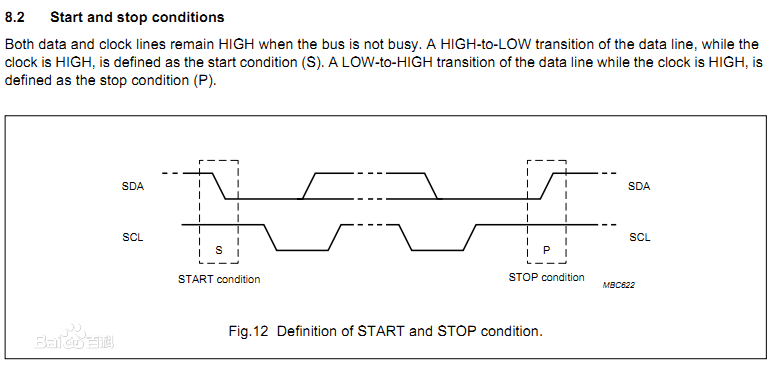
    I2C总线是飞利浦公司开发的一种双向二线制同步串行总线。只需要两根线便可在连接于总线上的器件之间进行传输信息。I2C通信为点对点通信,存在主设备和从设备之分。主从设备通过两根线进行通信,其中两根线分别是SDA和SCL,其中SDA为数据线,SCL为时钟线。

    i2c0.png

    :::

    主器件用于启动总线传送数据,并产生时钟以开放传送的器件,此时任何被寻址的器件均被认为是从器件.在总线上主和从、发和收的关系不是恒定的,而取决于此时数据传送方向。如果主机要发送数据给从器件,则主机首先寻址从器件,然后主动发送数据至从器件,最后由主机终止数据传送;如果主机要接收从器件的数据,首先由主器件寻址从器件.然后主机接收从器件发送的数据,最后由主机终止接收过程。在这种情况下,主机负责产生定时时钟和终止数据传送。
    i2c1.png
    通信过程包含应答响应,时钟同步。传输的数据字节格式有一定要求,每个字节必须为8位,每次发送的字节字数不受限制,每个字节后面必须跟一位校验位。应答响应,数据传输必须有响应,由主机产生,在响应中发送器将时钟线电平被拉高,接收器将电平拉低,保持稳定的电压差;时钟同步,数据传输只发生在时钟信号的高电平期间,所以需要同步双方时钟信号以确保数据的准确性;


    二、传感器SHT3X DIS

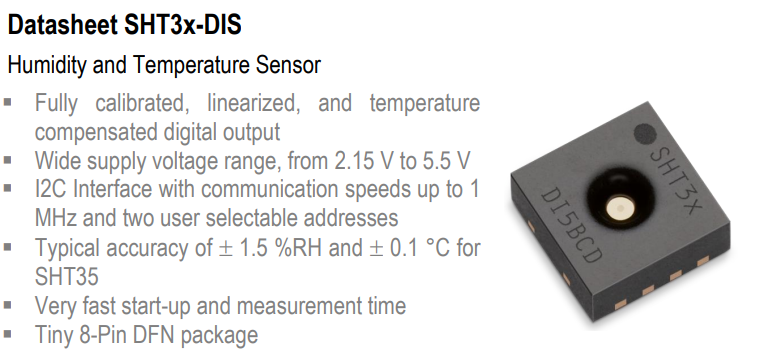
    Sensirion SHT3x-DIS湿度和温度传感器基于CMOSens®传感器芯片,更加智能、可靠,精度更高。SHT3x-DIS具有增强的信号处理能力、两个独特的用户可选I2C地址,通信速度高达1MHz。SHT35-DIS的典型相对湿度 (RH) 精度为±1.5%,典型温度精度为±0.1°C。SHT3x-DIS具有2.5mm x 2.5mm x 0.9mm(长x宽x高)占位面积,电源电压范围为2.4V至5.5V。
    ::: hljs-center

    SHT0.png

    :::

    2.1 特性

    • 完全校准、线性化和温度补偿的数字输出
    • I2C接口,通信速度高达1MHz,具有两个用户可选地址
    • SHT35的典型精度为+/-1.5% RH和+/-0.1°C
    • 启动和测量速度极快
    • 2.15V到5.5V的宽电源电压范围
    • 小型8引脚DFN封装

    2.2 引脚介绍
    主要引脚SDA,SCL,VCC,GND。
    ::: hljs-center

    SHT1.png

    :::

    2.3 通信过程

    • 开始测量
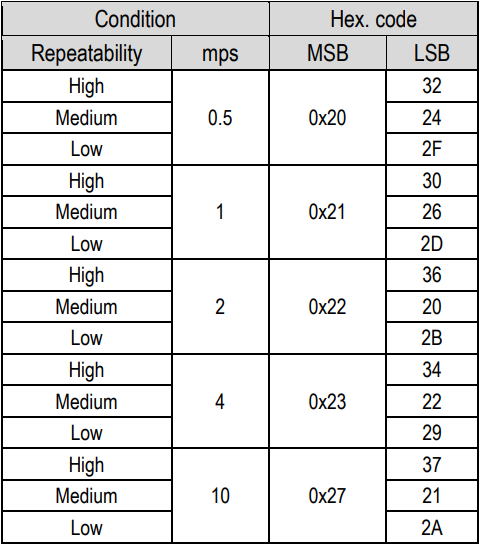
      在开始测量前,主设备必须先把开始测量的信号发送到传感器。发送的信号被称为I2C写入标头,由7比特的I2C设备地址和一个·0(0表示写入,1表示读取),再加上16比特的测量命令构成。当传感器接收到信号时,将会把SDA信号先拉低,响应信号ACK,在第八个时钟信号下降沿时表示传感器接收到了主设备的信号,开始测量。
      ::: hljs-center
    SHT2.png

    :::

    • 模式
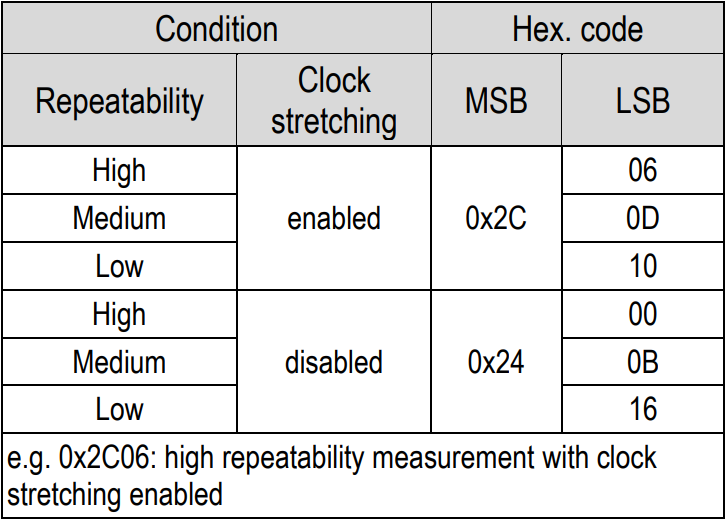
      传感器数据采集模式多种多样,我们可以选择不同的方式进行测量以满足不同的应用场景,这便是以上提到写入表头最后两位字节表示的是测量命令,大类分为两种采集模式。
      单次数据采集模式
      SHT3.png
      周期性数据采集模式
      SHT4.png
    • 其它命令
      除此之外,传感器里还设置了其它命令,可在传感器说明文档中查看。
    • 数据
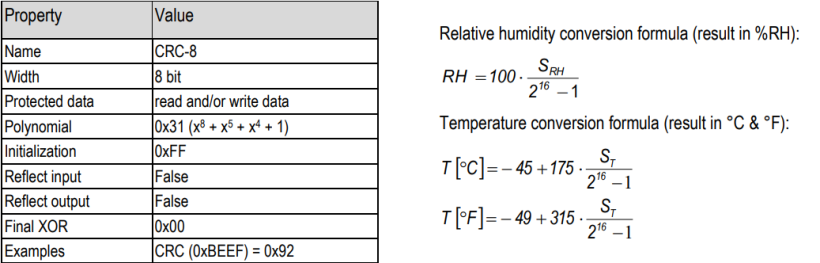
      当测量开始时,主设备便可以接收到信号,而此时标头要使用读取标头,将0改为1。传感器返回的后六位字节便是测量到的温度和相对湿度的数据。其中六个字节,高三位为两位温度和一位校验位,低三位为两位相对湿度和一位校验位,采用CRC校验。
      数据转换公式如下:
      ::: hljs-center
    SHT5.png

    :::


    三、简单实现

    以下代码只是简单地演示如何使用传感器,没有过多的规范要求。
    3.1 接口定义

    int SendCMD(char *devName, char addr, uint16_t command)
    {
        int fd = -1;
        uint8_t cmdBuf[2L] = {0};
        struct i2c_rdwr_ioctl_data i2c_data;
    
        fd = open(devName, O_RDWR); //获取I2C设备句柄
    
        i2c_data.nmsgs = 1;
        i2c_data.msgs = (struct i2c_msg *)malloc(i2c_data.nmsgs * sizeof(struct i2c_msg));
    
        ioctl(fd, I2C_TIMEOUT, 1);
        ioctl(fd, I2C_RETRIES, 2L);
    
        cmdBuf[0] = command >> 8L; //对指令数据进行处理 高八位和低八位
        cmdBuf[1] = command & 0xFF;
    
        i2c_data.msgs[0].len = 2L;
        i2c_data.msgs[0].addr = addr;
        i2c_data.msgs[0].flags = 0;
        i2c_data.msgs[0].buf = cmdBuf;
        ioctl(fd, I2C_RDWR, (unsigned long)&i2c_data); //将数据写入进行传输
    
        free(i2c_data.msgs);
        close(fd);
        return 0;
    }
    // 再定义一些数据转换函数和校验函数 简单的数据转换 忽略
    int ConvertTH(uint8_t tempRH, float *rawTemp, float *rawHum);
    ...

    3.2 主函数

    int main(int argc, char *argv[])
    {
        char *dev_name = "/dev/i2c-5";
    
        SendCMD(dev_name,ADDR,0x3093) //重启
        usleep(50L * 1000L);
        SendCMD(dev_name,ADDR,0x202F) //开始测量
        usleep(50L * 1000L);
    
        int fd = -1;
        struct i2c_rdwr_ioctl_data i2c_data;
        uint8_t rawData[6L] = {0};
        float rawTemp = 0, rawHum = 0;
    
        fd = open(devName, O_RDWR);
        i2c_data.nmsgs = 1;
        i2c_data.msgs = (struct i2c_msg *)malloc(i2c_data.nmsgs * sizeof(struct i2c_msg));
    
        i2c_data.msgs[0].len = 6L;
        i2c_data.msgs[0].addr = addr;
        i2c_data.msgs[0].flags = 1;
        i2c_data.msgs[0].buf = rawData;
    
        ioctl(fd, I2C_RDWR, (unsigned long)&i2c_data);
        free(i2c_data.msgs);
        close(fd);
    
        ConvertTH(rawData, &rawTemp, &rawHum);
        printf("Temp: %.2f°C\nHum: %.2f°F",rawTemp,rawHum);
    
        return 0;
    }

    四、采用标准系统HDF驱动实现

    使用到:九联科技unionpi_tiger开发板,SHT3x-DIS温湿度传感器,OpenHarmony源码。
    4.1 配置产品驱动(一般厂商都会配置好,若没配置可以跳转至官方文档查看详细教程)

    1. 实例化驱动入口:
      实例化HdfDriverEntry结构体成员。
      调用HDF_INIT将HdfDriverEntry实例化对象注册到HDF框架中。
    2. 配置属性文件:
      在device_info.hcs文件中添加deviceNode描述。
    //device_info.hcs 配置参考
    root {
    device_info {
    match_attr = "hdf_manager";
        device_i2c :: device {
        device0 :: deviceNode {
            policy = 2;
            priority = 50;
            permission = 0644;
            moduleName = "HDF_PLATFORM_I2C_MANAGER";
            serviceName = "HDF_PLATFORM_I2C_MANAGER";
            deviceMatchAttr = "hdf_platform_i2c_manager";
        }
        device1 :: deviceNode {
            policy = 0;                              // 等于0,不需要发布服务
            priority = 55;                           // 驱动启动优先级
            permission = 0644;                       // 驱动创建设备节点权限
            moduleName = "hi35xx_i2c_driver";        //【必要】用于指定驱动名称,需要与期望的驱动Entry中的moduleName一致;
            serviceName = "HI35XX_I2C_DRIVER";       //【必要】驱动对外发布服务的名称,必须唯一
            deviceMatchAttr = "hisilicon_hi35xx_i2c";//【必要】用于配置控制器私有数据,要与i2c_config.hcs中对应控制器保持一致
                                                    // 具体的控制器信息在 i2c_config.hcs 中
        }
        }
    }
    }
    // i2c_config.hcs 配置参考 (需要根据使用的开发板配置)
    root {
    platform {
        i2c_config {
        match_attr = "hisilicon_hi35xx_i2c";//【必要】需要和device_info.hcs中的deviceMatchAttr值一致
        template i2c_controller {           //模板公共参数,继承该模板的节点如果使用模板中的默认值,则节点字段可以缺省
            bus = 0;                          //【必要】i2c 识别号
            reg_pbase = 0x120b0000;           //【必要】物理基地址
            reg_size = 0xd1;                  //【必要】寄存器位宽
            irq = 0;                          //【可选】根据厂商需要来使用
            freq = 400000;                    //【可选】根据厂商需要来使用
            clk = 50000000;                   //【可选】根据厂商需要来使用
        }
        controller_0x120b0000 :: i2c_controller {
            bus = 0;
        }
        controller_0x120b1000 :: i2c_controller {
            bus = 1;
            reg_pbase = 0x120b1000;
        }
        ...
        }
    }
    }
    1. 实例化I2C控制器对象:
      初始化I2cCntlr成员。
      实例化I2cCntlr成员I2cMethod和I2cLockMethod。

    p.s 使用到的九联开发板已有相关配置,以上配置无需做更改或添加。

    1. 一个结构三个接口
    • I2cMsg结构体:用于传输数据载体,由地址addr,缓存buf,缓存长度len,信号标记flags组成。
    struct I2cMsg {
        /** Address of the I2C device */
        uint16_t addr;
        /** Address of the buffer for storing transferred data */
        uint8_t *buf;
        /** Length of the transferred data */
        uint16_t len;
        /**
         * Transfer Mode Flag | Description
         * ------------| -----------------------
         * I2C_FLAG_READ | Read flag
         * I2C_FLAG_ADDR_10BIT | 10-bit addressing flag
         * I2C_FLAG_READ_NO_ACK | No-ACK read flag
         * I2C_FLAG_IGNORE_NO_ACK | Ignoring no-ACK flag
         * I2C_FLAG_NO_START | No START condition flag
         * I2C_FLAG_STOP | STOP condition flag
         */
        uint16_t flags;
    };
    • 三个接口分别为I2cOpen()、I2cClose()、I2cTransfer()。
    //number指I2C所挂载的总线号
    DevHandle I2cOpen(int16_t number); 
    //handle是I2cOpen()返回的设备句柄
    void I2cClose(DevHandle handle); 
    //msgs所要传输的数据结构体,count是传输结构体的大小
    int32_t I2cTransfer(DevHandle handle, struct I2cMsg *msgs, int16_t count); 

    4.3 代码

    • 头文件
    #include <cstdio> //标准输入输出
    #include <unistd.h> //使用到usleep()进程挂起函数
    
    #include "i2c_if.h" //HDF i2c 接口
    #include "hdf_log.h" //日志打印头文件
    • 结构体与接口
    // 重新定义结构体方便使用
    typedef struct
    {
        struct I2cMsg * i2cMsg;
        uint8_t msgLen; //i2cMsg的长度
    } I2cMessage;
    
    //定义命令发送函数
    int32_t SendCMD(DevHandle handle,uint16_t command)
    {
        int32_t ret;
        I2cMessage i2cMessage;
        i2cMessage.msgLen = 1;
        i2cMessage.i2cMsg = new I2cMsg[1]; //申请内存
        uint8_t cmdBuf[2L] = {0};
    
        cmdBuf[0] = command >> 8L; //将命令拆分成高低位分别保存
        cmdBuf[1] = command & 0xFF;
    
        i2cMessage.i2cMsg[0].len = 2L;
        i2cMessage.i2cMsg[0].addr = ADDR;
        i2cMessage.i2cMsg[0].flags = WRITE_FLAGS;
        i2cMessage.i2cMsg[0].buf = cmdBuf;
        ret = I2cTransfer(handle,i2cMessage.i2cMsg,i2cMessage.msgLen);
        if(ret < 0){
            LOGE("%s: SendCommend faided",__func__);
            delete i2cMessage.i2cMsg;
            return -1;
        }
    
        delete i2cMessage.i2cMsg; //释放内存
        usleep(50L * 1000L); //等待发送完成
        return 1;
    }
    • 主函数
    int main(int argc, char** argv)
    {
        /**
         * 数据初始化
        */
        DevHandle i2cHandle;
    
        /**
         * 获取句柄 
        */
        i2cHandle = I2cOpen(BUSID);
        if(i2cHandle == NULL){
            LOGE("%s:get handle failed",__func__);
            I2cClose(i2cHandle);
            return 0;
        }
    
        /**
         * 发送命令
        */
        SendCMD(i2cHandle,0x3093); //关闭reset命令
        SendCMD(i2cHandle,0x202F); //发送命令 repeatability=Low mps=0.5
    
        /**
         * 接收数据
        */
        I2cMessage i2cMessage;
        i2cMessage.msgLen = 1;
        i2cMessage.i2cMsg = new I2cMsg[1];
        uint8_t regData[6L] = {0};
    
        i2cMessage.i2cMsg[0].len = 6L;
        i2cMessage.i2cMsg[0].addr = ADDR;
        i2cMessage.i2cMsg[0].flags = READ_FLAGS;
        i2cMessage.i2cMsg[0].buf = regData;
        I2cTransfer(i2cHandle,i2cMessage.i2cMsg,i2cMessage.msgLen);
        delete i2cMessage.i2cMsg;
    
        /**
         * 数据处理
        */
        uint16_t value = 0;
        value = regData[0] << 8;
        value = value | regData[1];
        printf("Temperature: %.2f C\n",175.0f * (float)value / 65535.0f - 45.0f);
        value = 0;
        value = regData[3] << 8;
        value = value | regData[4];
        printf("Humidity: %.2f H\n",100.0f * (float)value / 65535.0f);
        /**
         * 关闭设备
        */    
        I2cClose(i2cHandle);
        return 0;
    }

    至此,成功通过OpenHarmony的HDF驱动来获取传感器的值

    五、实现NAPI

    5.1 模块定义与注册

    /**
     * 模块定义
    */
    static napi_module i2cHDF_demoModule = {
        .nm_version = 1,
        .nm_flags = 0,
        .nm_filename = nullptr,
        .nm_register_func = registerI2cHDF_DemoApis,
        .nm_modname = "i2chdf_demo",
        .nm_priv = ((void *)0),
        .reserved = {0},    
    };
    
    
    /**
     * 模块注册
    */
    extern "C" __attribute__((constructor)) void RegisterI2cHDFoModule(void)
    {
        napi_module_register(&i2cHDF_demoModule);
    }

    5.2 接口定义与注册

    int32_t SendCMD(DevHandle handle,uint16_t command)
    {
        int32_t ret;
        struct I2cMsg * i2cMsg;
        int msgLen = 1;
        i2cMsg = new I2cMsg[msgLen];
        uint8_t cmdBuf[2L] = {0};
    
        cmdBuf[0] = command >> 8L;
        cmdBuf[1] = command & 0xFF;
        i2cMsg[0].len = 2L;
        i2cMsg[0].addr = ADDR;
        i2cMsg[0].flags = WRITE_FLAGS;
        i2cMsg[0].buf = cmdBuf;
        ret = I2cTransfer(handle,i2cMsg,msgLen);
    
        delete i2cMsg;
        usleep(50L * 1000L);
        return 1;
    }
    
    /**
     * 接口定义
    */
    static napi_value readI2cBuf(napi_env env,napi_callback_info info)
    {
        napi_value ret;
    
        DevHandle i2cHandle;
        i2cHandle = I2cOpen(BUSID);
    
        SendCMD(i2cHandle,0x3093);
        SendCMD(i2cHandle,0x202F);
    
        struct I2cMsg * i2cMsg;
        int msgLen = 1;
        i2cMsg = new I2cMsg[msgLen];
        uint8_t regData[6L] = {0};
    
        i2cMsg[0].len = 6L;
        i2cMsg[0].addr = ADDR;
        i2cMsg[0].flags = READ_FLAGS;
        i2cMsg[0].buf = regData;
        I2cTransfer(i2cHandle,i2cMsg,msgLen);
        delete i2cMsg;
    
        uint16_t value = 0;
        double sHTTemp = 0;
        value = regData[0] << 8;
        value = value | regData[1];
        sHTTemp = 175.0f * (double)value / 65535.0f - 45.0f;
    
        //设计思路与上HDF大同小异,只不过将最后获取的值通过转换再返回
        //此处只处理返回温度的值,方便演示
        NAPI_CALL(env, napi_create_double(env, sHTTemp, &ret));
        return ret;
    }
    
    
    /**
     * 接口注册
    */
    static napi_value registerI2cHDF_DemoApis(napi_env env, napi_value exports)
    {
        napi_property_descriptor desc[] = {
            DECLARE_NAPI_FUNCTION("readI2cBuf",readI2cBuf), //NAPI名字,上面的函数
        };
        NAPI_CALL(env,napi_define_properties(env,exports,sizeof(desc)/sizeof(desc[0]),desc));
        return exports;
    }

    `
    5.3 北向接口

    • NAPI
    function readI2cBuf(): number;
    • Index.ets
    import i2chdf from '@ohos.i2chdf'
    
    @Entry
    @Component
    struct Index {
      @State message: string = 'Temperature: '+ i2chdf.readI2cBuf().toFixed(2) + '°C';
    
      aboutToAppear(): void{
        var Id = setInterval(() =>{
          this.message = 'Temperature: '+ i2chdf.readI2cBuf().toFixed(2) + '°C';
        },1000)
      }
    
      build() {
        Row() {
          Column() {
            Text(this.message)
              .fontSize(50)
              .fontWeight(FontWeight.Bold)
          }
          .width('100%')
        }
        .height('100%')
      }
    }

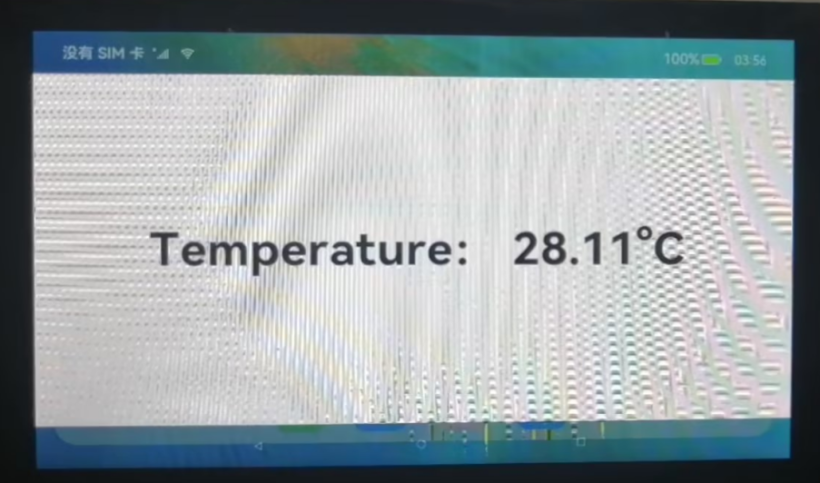
    5.4 效果演示
    ::: hljs-center

    result.png

    :::

    总结

    整个案例整体思路都是围绕着I2C通信流程和SHT3x温度传感器工作流程展开的。而在HDF驱动的使用中,我们会发现,获取设备句柄的方式我们只用一个数字就可以,相比之前的”/dev/i2c-5″更加简易明了,这也是HDF的特性之一。NAPI的实现,将整个OpenHarmoy南北向打通,使得北向程序可通过本地的接口就可以访问传感器的温湿度。

  • 饥荒联机版模组编写教程

    ECOSYSTEM

    Positive growth.

    Nature, in the common sense, refers to essences unchanged by man; space, the air, the river, the leaf. Art is applied to the mixture of his will with the same things, as in a house, a canal, a statue, a picture.

    But his operations taken together are so insignificant, a little chipping, baking, patching, and washing, that in an impression so grand as that of the world on the human mind, they do not vary the result.

    The sun setting through a dense forest.
    Wind turbines standing on a grassy plain, against a blue sky.
    The sun shining over a ridge leading down into the shore. In the distance, a car drives down a road.

    Undoubtedly we have no questions to ask which are unanswerable. We must trust the perfection of the creation so far, as to believe that whatever curiosity the order of things has awakened in our minds, the order of things can satisfy. Every man’s condition is a solution in hieroglyphic to those inquiries he would put.